The Houstonian Club is excited to introduce
Alaris, our new online reservation and check-in system for the Youth Department. All reservations and check-ins now occur on this new system.
Click here to see directions on setting up your Alaris account and start making reservations for the Bungalow and Houstonian Hideout! If you have any questions about Alaris, please email
youth@houstonian.com.
Frequently Asked Questions
What is my barcode?
- Your barcode is your extended member number. For example: if the member number is 13409, the extended member number will have an "-0” or usually a "-1” at the end (ex. 13409-0). This is the same extended member number you use to log in to the Houstonian app. If you are still having issues registering or accessing your account, please email youth@houstonian.com.
Are reservations required?
- To help us maintain appropriate staffing and ratios, reservations are required every day for children under the age of 2. On weekends, all areas of the Youth Department require reservations regardless of the age of the child or the time of day.
How far in advance can reservations be made?
- Associate Members may make reservations 3 days in advance and Resident Members may make reservations 5 days in advance.
Will walk-ins be accepted?
- Walk-ins will be accepted when space allows, provided we can maintain our required staff-to-child ratios based on expected reservations. While we will always do our best to accommodate walk-ins, priority will be given to families with reservations. We strongly encourage making reservations to guarantee your child’s spot.
How do I make a reservation?
- Reservations can easily be made through the Houstonian app. Simply select the "Youth” header and then the "Youth Reservations” tab which will open the Alaris portal.
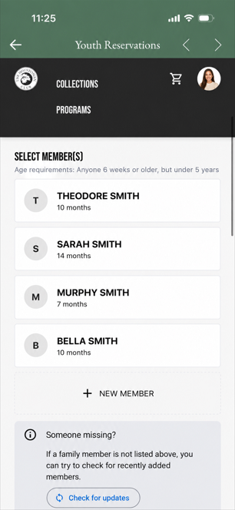
My children are not appearing on my Alaris account.
- Before adding your child as a new member, please click on the "Check for updates” button below the "Someone missing?” tab. If your child is still not appearing, please add them as a guest and email youth@houstonian.com to have the account synced.
Can I add a guest at check-in?
- All guests need to be added through Alaris. You will log in, click on the image icon in the upper right corner, go to "Family”, and click "Create a new guest profile”. The profile created will pop-up during check-in.
Can I order food from The Kitchen through Alaris?
- Unfortunately, food orders cannot be placed through the check-in system at this time. However, upon arrival the Youth Team will provide a food order form for Members to select what they would like to order for their child.
If I arrive late to my appointment, can I still utilize the 3 hours maximum?
- Extending your reservation due to a late arrival will depend on staffing availability and other scheduled reservations. We encourage you to arrive on time to ensure you can fully utilize your desired childcare hours as extensions cannot be guaranteed.